LS25 Realistic Animal Names V2.2.0.0

LS25 Realistic Animal Names V2.2.0.0
Realistic Animal Names Mod for Farming Simulator 25. Adds immersive custom naming to all animals with floating name tags, bringing personality and identity to your farm’s livestock.
MAIN FEATURES:
– Custom Animal Names: Give each animal a unique, personalized name
– Floating Name Tags: Names appear above animals with distance-based scaling
– UTF-8 Support: Full international characters and emoji support.
– Configurable Settings: Adjust visibility, distance, height, and font size
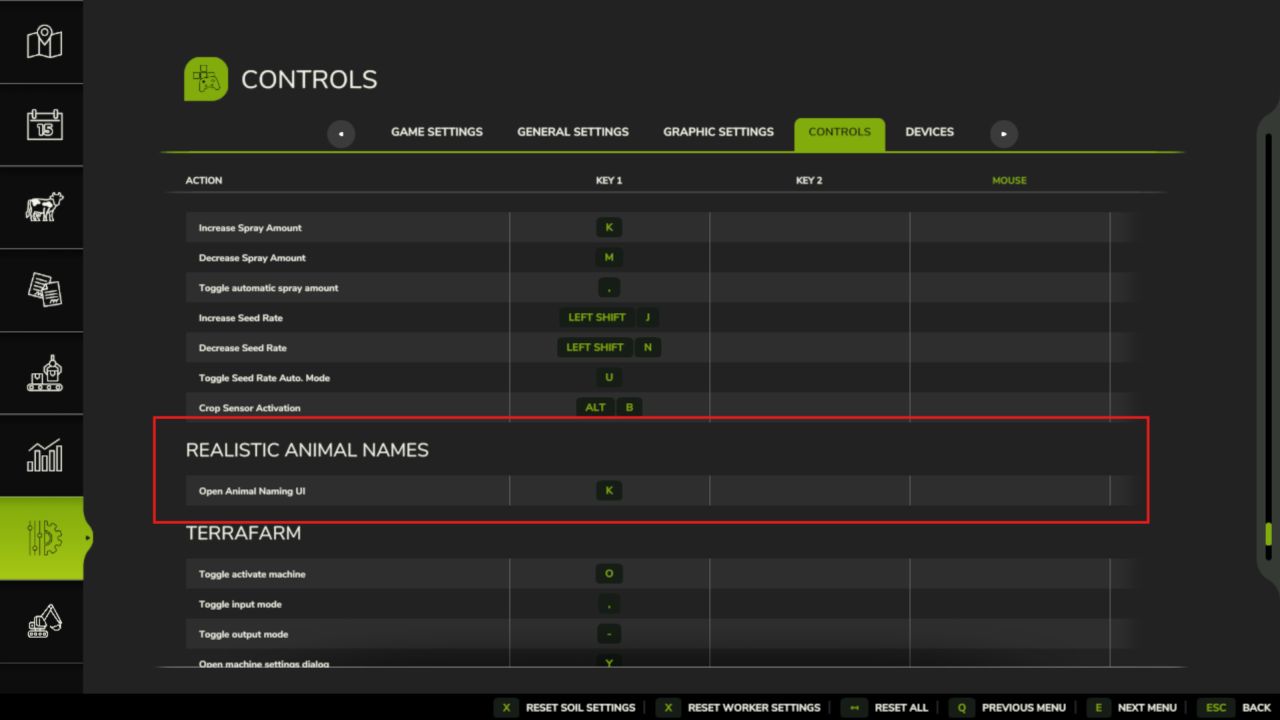
– Keybind Support: Quick access with customizable keybind (default: K)
– Per-Savegame Storage: Each save has its own set of animal names
– Multiplayer Compatible: Full network synchronization (v2.2.0 enhanced!)
– Integrated Settings: All settings accessible through game’s settings menu
– Performance Optimized: Smart culling and frame-sliced rendering
– API Support: Other mods can read/write animal names
The mod features full multiplayer synchronization with improvements:
– Names set by any player are visible to all players instantly
– Server-authoritative save system (no conflicts)
– Sync confirmation for clients
– Automatic sync when clients join
– Timeout protection and error recovery
– Reduced network traffic
Note: Only the server host needs to have the mod installed. Clients will automatically receive the mod data when connecting.
SUPPORTED ANIMALS:
– Cows (all types)
– Pigs (all breeds)
– Chickens
– Sheep
– Horses
– All other FS25 animal types
COMPATIBILITY:
– Multiplayer: Fully supported across all players
– Mod Compatibility: No known conflicts with other mods
– Save Games: Safe to add/remove from existing saves
– Performance: Minimal impact (1-2 FPS with many animals)
WHY USE THIS MOD?
This mod transforms your livestock from generic animals into personalized farm members. Watch as “Cow #17” becomes “Daisy” or “Pig #42” becomes “Wilbur.” Perfect for:
– Roleplayers who want named animals
– Family farms naming animals after family members
– Educational play teaching children about animal care
– Streamers creating engaging content with named animals
– Anyone wanting more immersion in their farming experience
Adds charm, personality, and realism to your farming operation. No more anonymous livestock – every animal has its own identity! Perfect for players who want to build emotional connections with their virtual livestock and create memorable farm stories.
V2.2.0.0
Enhanced Multiplayer Synchronization
– Full network event system with timeout handling
– Sync completion confirmation for clients
– Improved conflict resolution
– Better error recovery on network issues
UTF-8 Character Support
– Full international character support in animal names
– Proper UTF-8 length validation
– Safe multibyte character truncation
– Emoji support
UI Improvements
– Character counter with color feedback (green/yellow/red)
– Better keyboard navigation
– Improved focus management
– Disabled button states for better UX
– Enhanced accessibility
API Enhancements
– New `setAnimalName()` API function for mod integration
– Better error handling and validation
– Improved performance optimizations
Documentation
– Added VISION.md with project goals and philosophy
– Created comprehensive ROADMAP.md
– Detailed TODO.md for tracking features
– Updated README with better examples
Bug Fixes
– Fixed multiplayer synchronization issues
– Resolved character encoding problems
– Improved input validation
– Better error handling throughout