LS25 Direct Silo Sell V1.0.0.1

LS25 Direct Silo Sell V1.0.0.1
Direct Silo Sales for Farming Simulator 25 (PC, single-player)
Install:
Copy FS25_DirectSiloSales.zip into Documents/My Games/FarmingSimulator2025/mods.
Enable the mod for your save. Press Left Shift + S to open the sale menu (or rebind in game).
You must be on foot for this keyboard shortcut. You can also use dssMenu in the developer console.
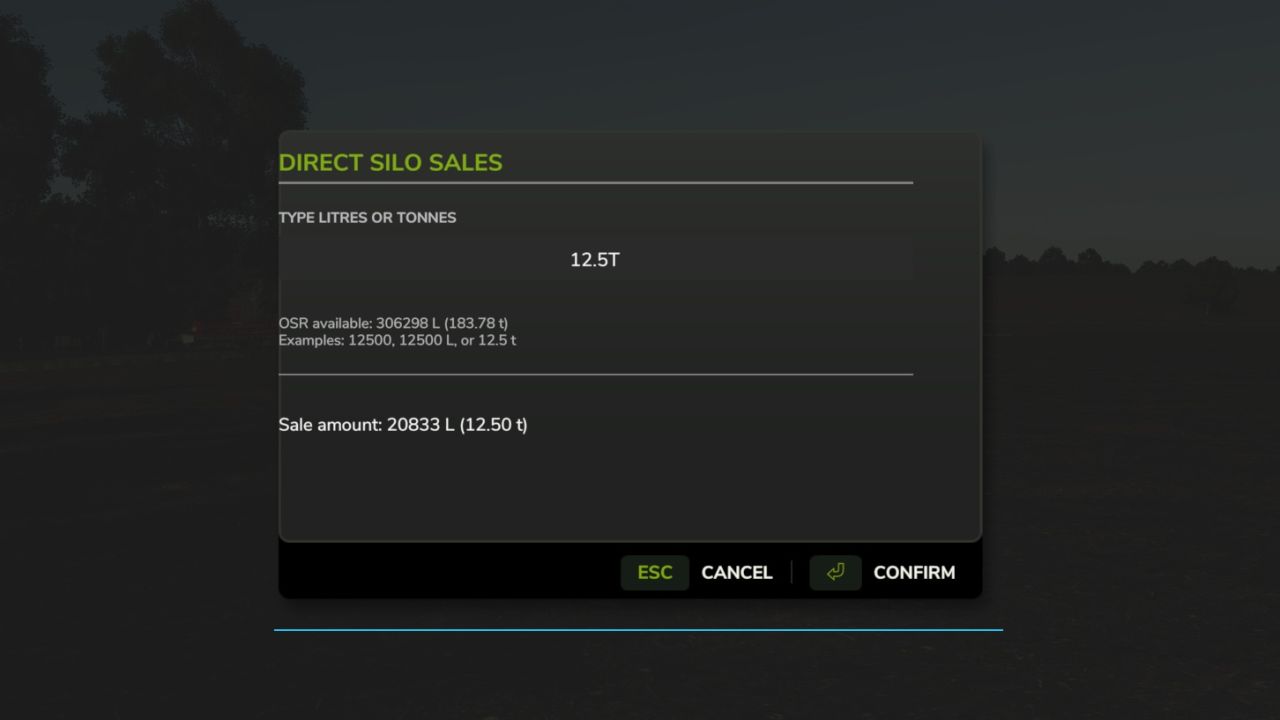
Choose a silo, crop, selling point, and 25%, 50%, or all of the stored crop.
The menu shows each selling point’s current price per 1,000 L and asks for confirmation.
The developer console commands remain available as an alternative:
Commands:
dssList
Lists your owned silos, stored crops, and all selling points.
dssSell <silo number> <CROP> <sell point number> [liters]
Sells the entire stored amount if liters is omitted.
Example: dssSell 1 WHEAT 3 10000
Fully compatible with Market Dynamics. Adds realism by selling grain forward for better price. Good for large scale farming.
V1.0.0.1
Added ability to type in exact litres OR tonnes to sell.