LS25 Adjust Reel and Auger Speed V1.0.0.0



LS25 Adjust Reel and Auger Speed V1.0.0.0
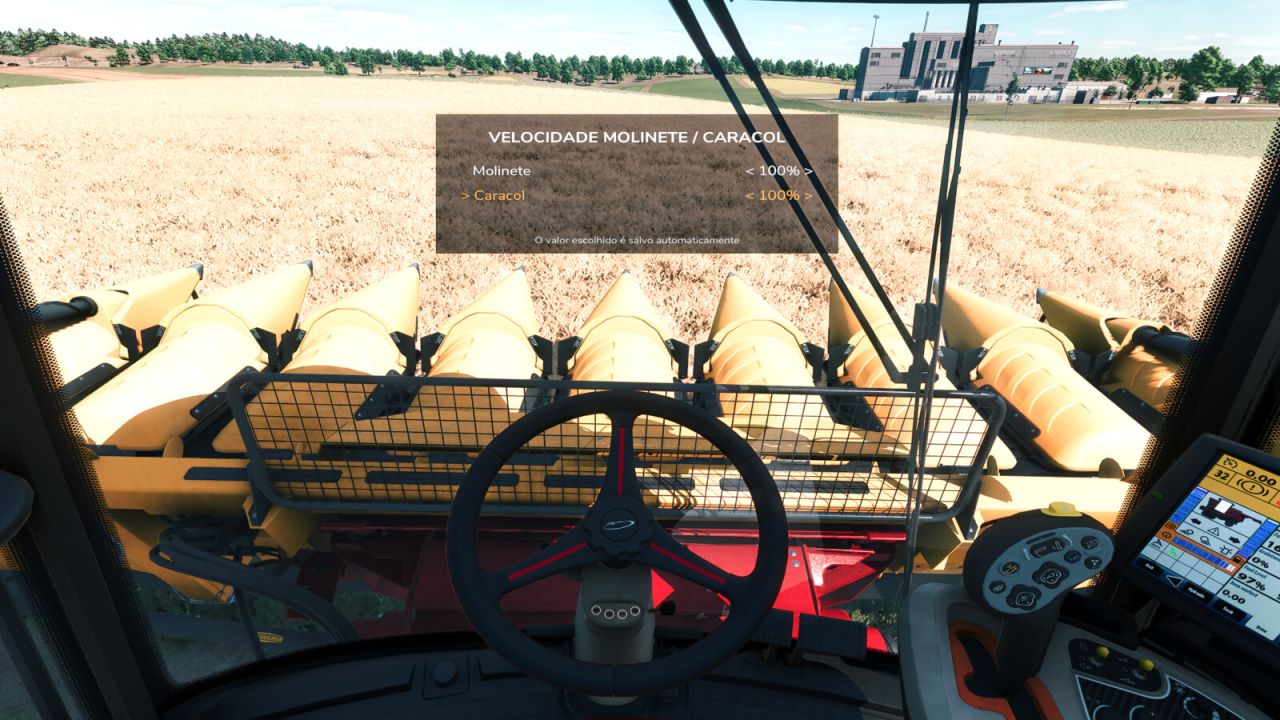
No more opening the platform XML to adjust the reel! With this mod, you can control the speed of the reel and auger of any harvesting header directly in-game, as a percentage.
How it works
Enter a vehicle with an attached header, open the menu using the shortcut, and choose the desired speed for the reel and auger separately.
Features
Independent adjustment of the reel and auger
Speed from 10% to 400%, in 10% increments
Works with any header, without editing XML
Each header remembers its own speed (new ones start at 100%)
Settings are saved with your savegame
Button to reset the current header to 100%
Button to reset all headers at once
Multiplayer compatible
Fully configurable keys in the game’s control settings
Texts in Brazilian Portuguese, Portuguese, and English
Shortcuts (default)
Left Alt + O: open/close the menu
Left Alt + Up/Down: select reel or auger
Left Alt + Left/Right: decrease/increase the speed
Left Alt + R: reset this header to 100%
Left Alt + T: reset all headers to 100%