LS25 Road Painter V1.0.0.0

LS25 Road Painter V1.0.0.0
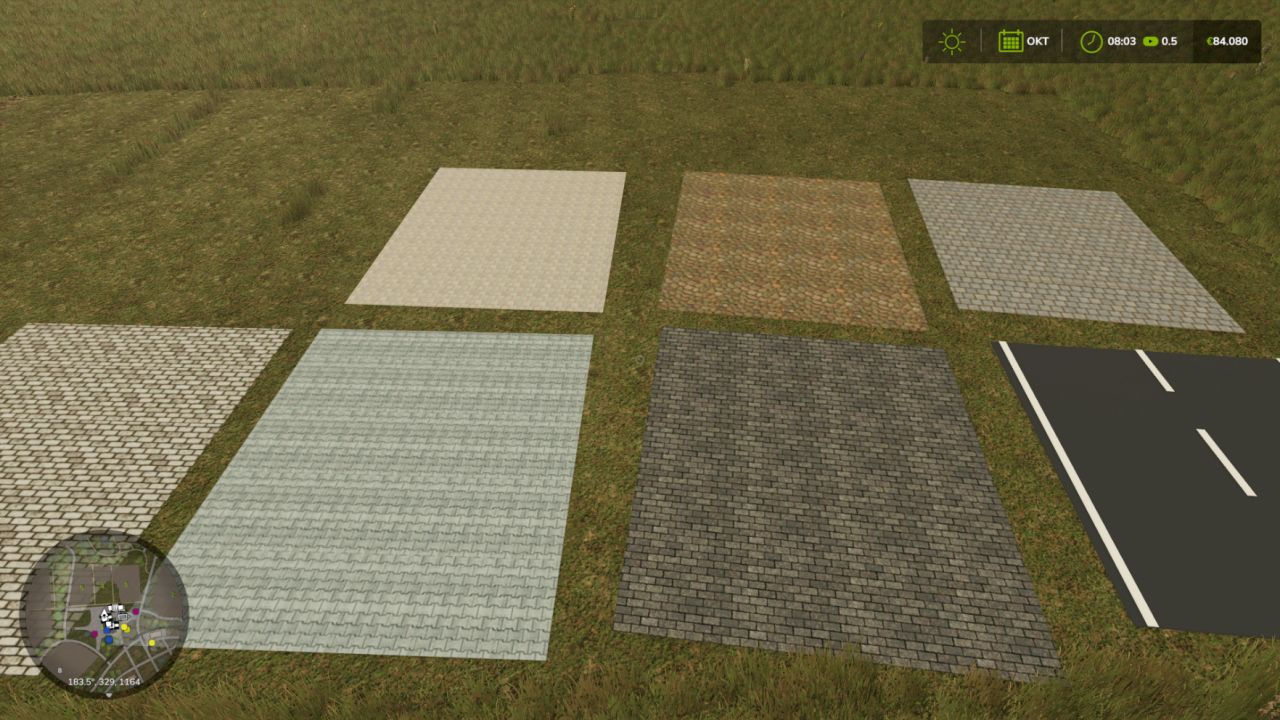
With Road Painter for LS25, you can create your own roads directly in the game. Different surfaces, freely drawn routes and ready-made intersection templates allow you to customize your farm roads and connecting routes.
Features and keyboard shortcuts
Alt + Insert – Open or close the drawing view.
F2 – Change surface: asphalt, French cobblestone, bone paving, three cobblestone variants and paving stones.
F3 – Choose road width: 3, 4, 5, 6, 7 or 8 metres.
F4 – Adjust orientation: Rotate intersections in 15° steps or, in curve mode, change the bend and curve side.
F5 – Change construction template: road, T-junction or X-junction.
F6 – Turn placement aid on or off: preview with guide lines and crosshair.
F7 – Choose straight or freehand: also ends curve mode.
F8 – Turn two-point curve mode on or off: click the starting point, choose the bend with F4 and click the end point.
F9 – Turn the road tool on or off.
F10 – Undo: Remove the last road from your own farm or discard a saved curve start.
Left mouse button – Build: Hold, drag and release for freehand routes and straight roads. Place intersections with a click.
Arrow keys – Move the camera: Hold Shift to move faster. Alternatively, move the mouse to the edge of the drawing area.
Esc – Leave the drawing view.
Notes: For LS25 on PC. Multiplayer is currently a test version. No automatic terrain leveling.