LS25 Hide Help Texts – Declutter your HUD V1.0.0.0



LS25 Hide Help Texts – Declutter your HUD V1.0.0.0
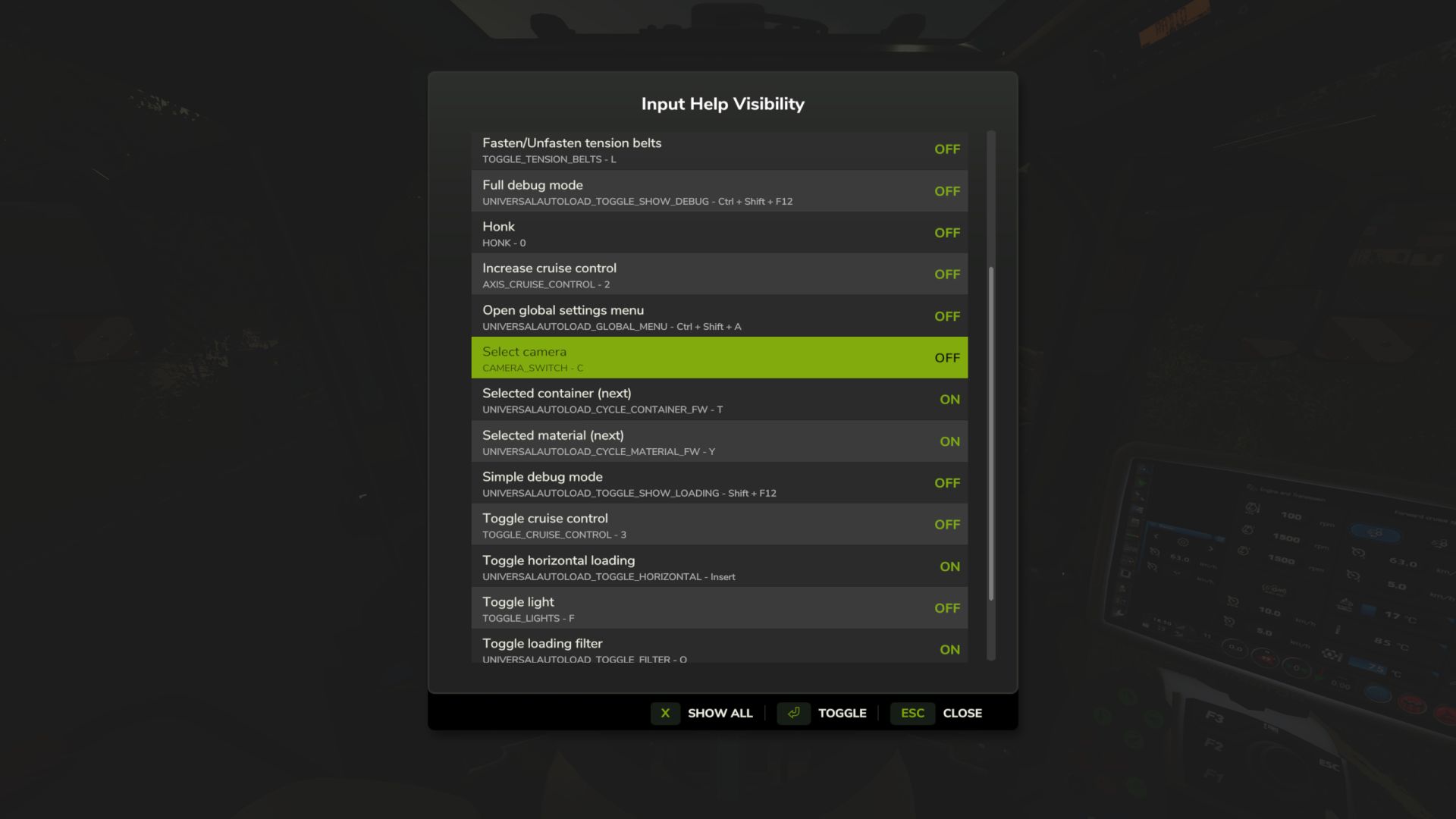
When the game and mods all add their own help texts to the HUD it quickly gets crowded. Do you really need to be reminded that F turns on the flashlight or that there is a keybinding to show Courseplay’s debug channels? This mod lets you hide the help texts you don’t need so the ones you actually want are more visible.
Supports multiplayer.
Features
– In-game settings dialog (RightShift+H, keybinding configurable)
– Toggle help texts ON/OFF individually
– Switch between current context and all discovered help texts
– Console commands: hhtList to view all, hhtToggle <id> to toggle
– Help texts discovered automatically as you play
– Settings persist across sessions in XML file
Usage
1. Install the mod and play normally
2. Press RightShift+H to open settings
3. Toggle unwanted help texts to OFF
4. Settings save when you close the dialog
V1.0.0.0
Available on ModHub
Added German localization